
Employees and Access

Certificado, en cumplimiento, protegido.

Desde una primera certificación hasta un programa maduro con varios marcos, Qalea mantiene a las empresas medianas certificadas, en cumplimiento y protegidas todo el año. Un único proveedor para ISO 27001, ENS y SOC 2, tus personas y toda tu superficie de ataque, con una responsabilidad clara sobre tu postura de seguridad.
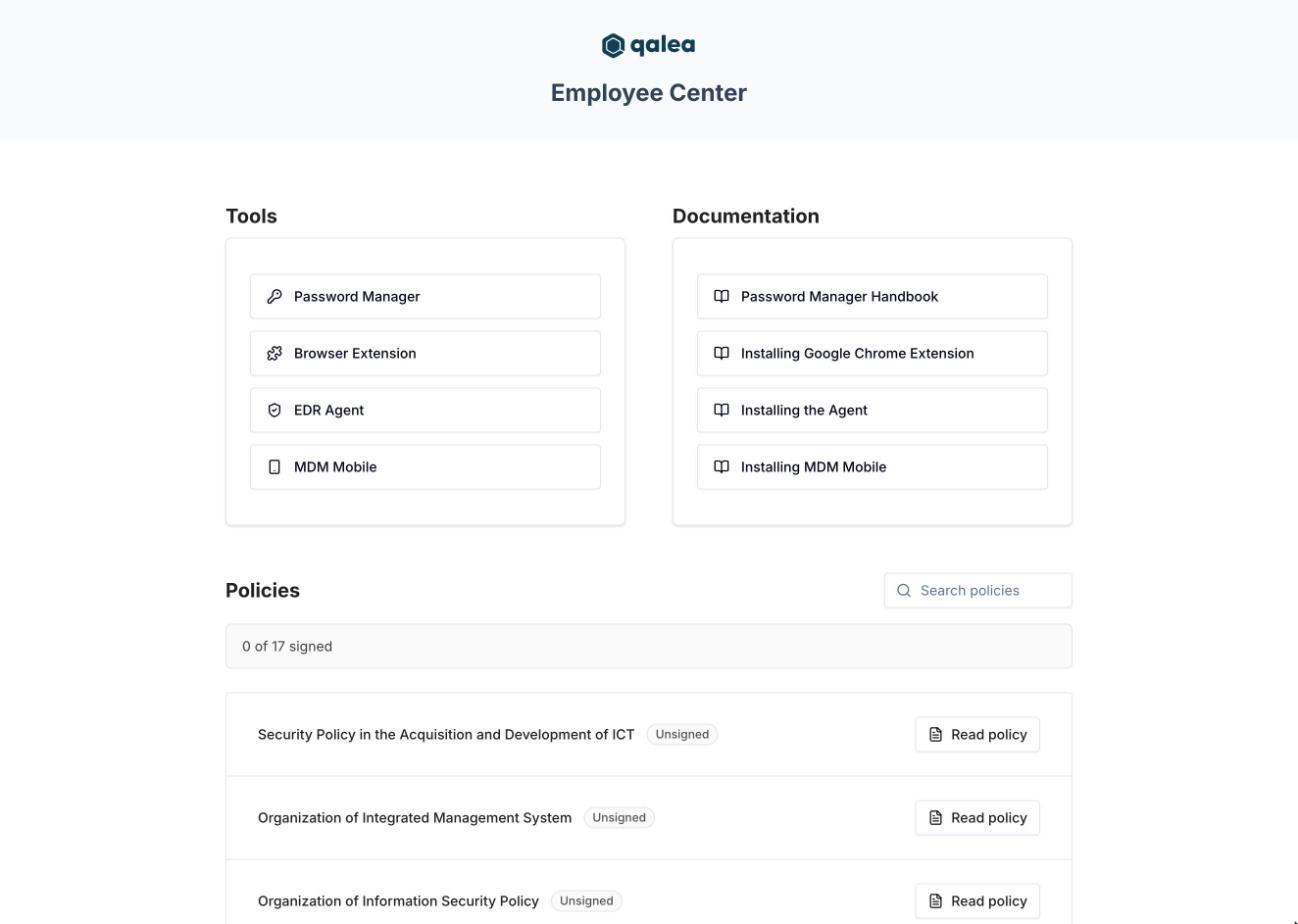
Qalea Employee Center with tools to install, user guides and policies to sign
Employee Center
17 policies to read and sign
People and accounts

What employee and access management covers

Employee and access management means knowing who works in the company, which accounts each person has in every tool, and which security policies they have signed. Qalea keeps this in sync with Google Workspace or Microsoft 365 and the other tools you connect.

01

Employees dashboard

Each employee with role, department, SaaS tools, SSO, policy signature and training status.
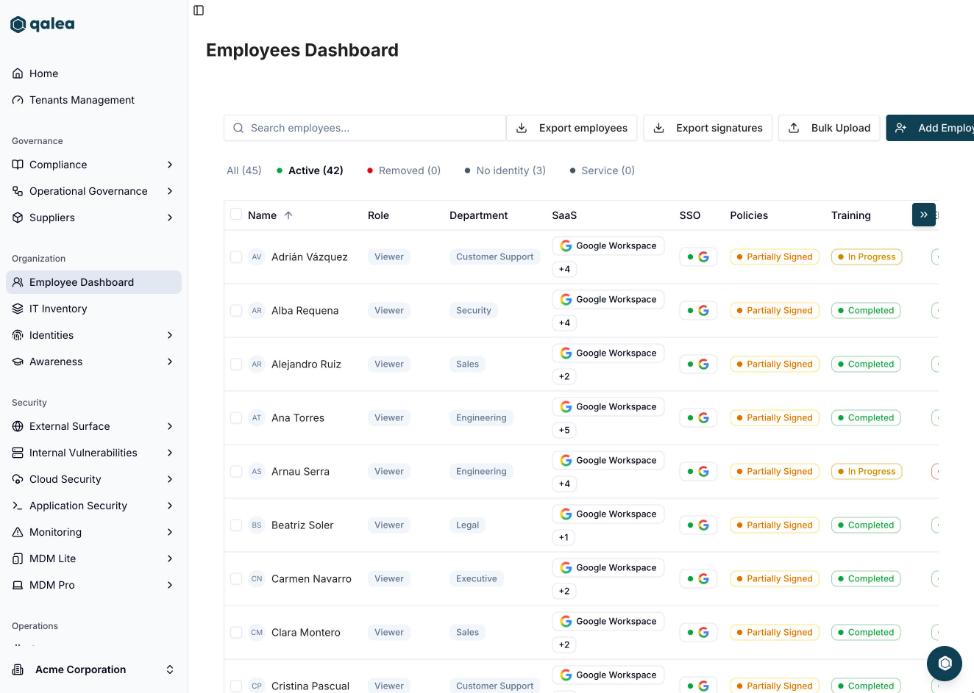
Employees dashboard in Qalea with role, department, SaaS, SSO, policies and training
02

SaaS management

Departments with their members and the tools each one uses.
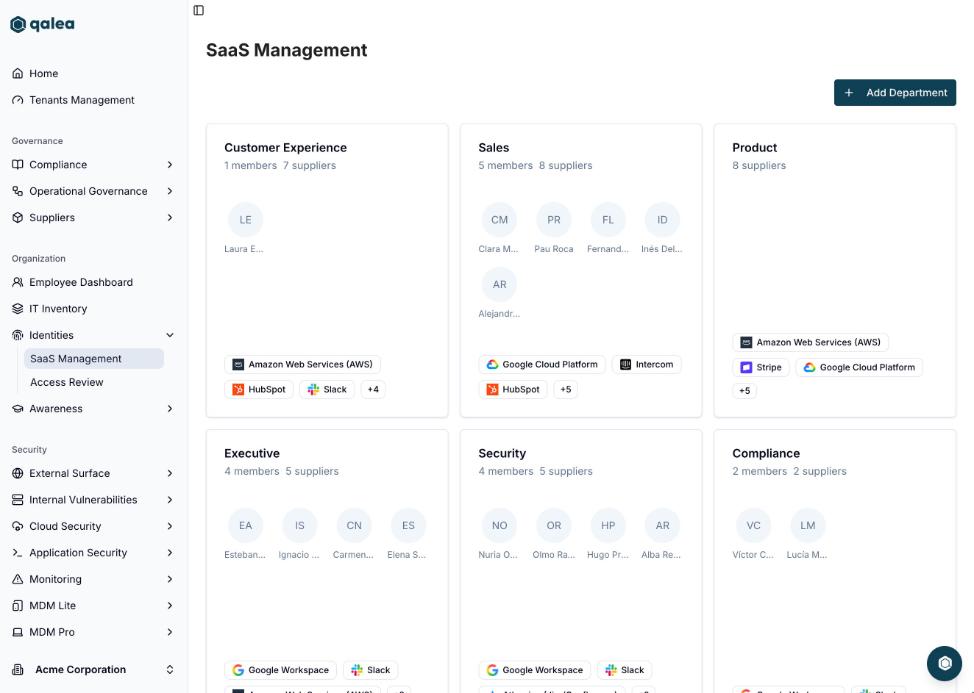
SaaS management in Qalea with departments, members and their tools
03

Employee Center

One portal for every employee, with policies to read and sign, the tools to install and a user guide for each one. Every signature is recorded.

04

Qalea Pass

A corporate password manager with browser extensions for Chrome and Firefox.

Works with the tools you use
Google Workspace
Microsoft 365
Slack
Notion
GitHub
GitLab
AWS
Google Cloud
Access review

Every account, with its owner, status and 2FA

Identities. Accounts in each connected tool with their status, 2FA and role, so accounts of former employees and unnecessary administrator rights are easy to spot.

Two factor authentication. See which accounts have 2FA disabled, tool by tool.

Former employees. Accounts whose owner has left the company stand out, so they can be closed.
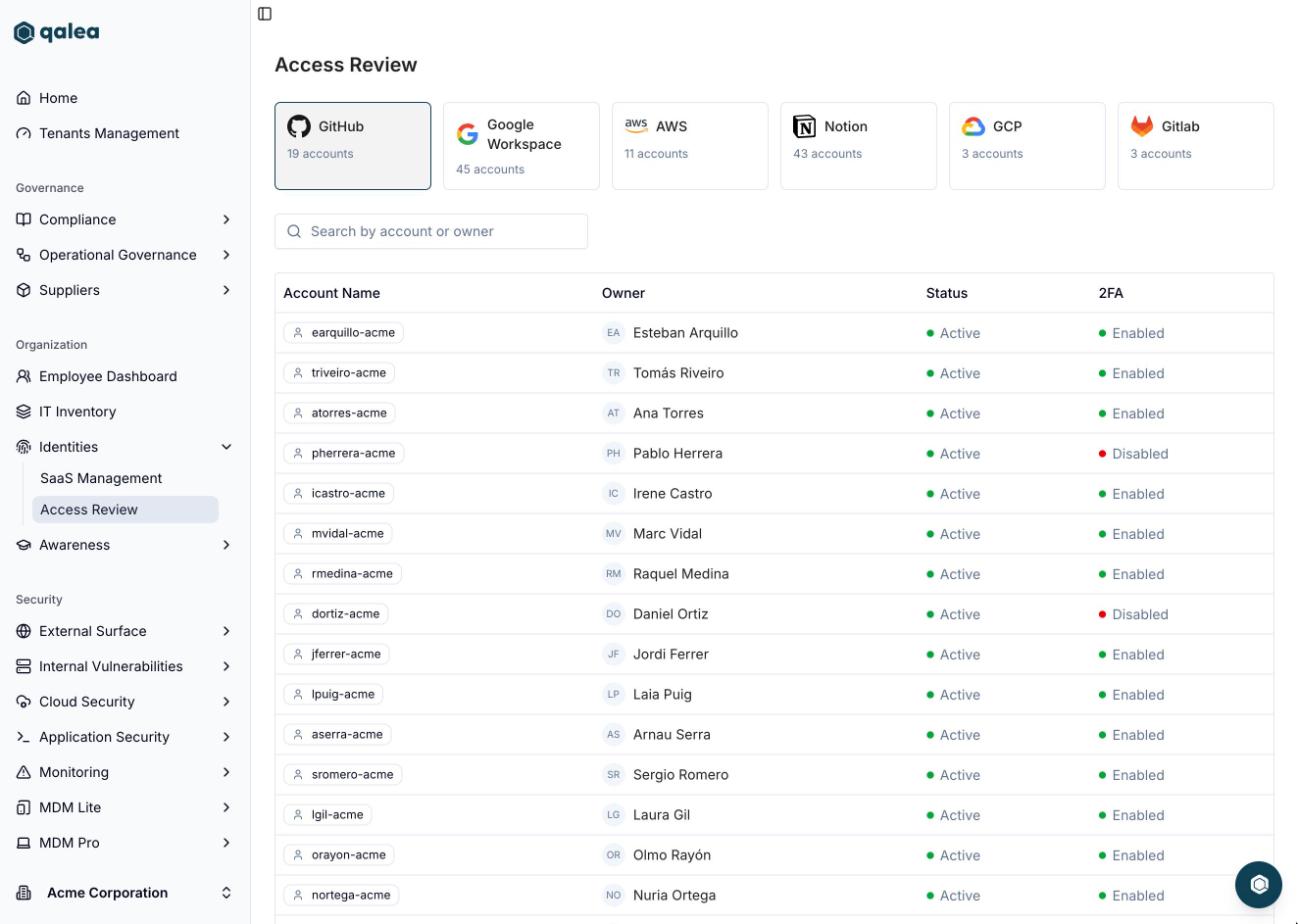
Access review in Qalea with accounts per tool, owner, status and 2FA
Accounts per tool
Google Workspace45
GitHub19
Connected tools
6 tools in the access review
How it works

From connection to evidence

1

Connect your tools

Google Workspace or Microsoft 365, plus tools such as GitHub and AWS.

2

Review access

See each account's status, 2FA and role, tool by tool.

3

Sign policies

Employees sign from the Employee Center, and every signature is recorded.

4

Export evidence

Signatures can be exported for the audit.

Frameworks

Evidence for your frameworks

Access control, identity management and policy acceptance are controls in ISO 27001, ENS, SOC 2 and NIS2. The access and signature records are linked to those controls in the platform.

ISO 27001

ENS

SOC 2

NIS2

FAQs

Todo lo que necesitas saber sobre Qalea

What is an access review?
A periodic check of who has an account in each tool, with which role and whether 2FA is enabled, so access that is no longer needed can be removed.
¿Cómo ayuda la IA de Qalea con la automatización del cumplimiento?
Descubre activos, extrae evidencias de tu stack y las asigna a controles. Redacta y actualiza políticas, vincula riesgos con controles y asigna responsables. Vigila las desviaciones, detecta brechas y propone soluciones. Empaqueta evidencias listas para auditoría bajo demanda y responde al «porqué» con contexto trazable.
¿Qué marcos de seguridad y regulaciones son compatibles?
ISO 27001, SOC 2, NIS2, DORA, ENS, PCI-DSS, GDPR e ISO 9001. Los controles se asignan automáticamente, de modo que una sola acción satisface múltiples requisitos. Las evidencias se reutilizan entre marcos, así que un control satisface muchos requisitos. Se admiten asignaciones personalizadas.
¿Puede Qalea integrarse con las herramientas que ya usamos (AWS, Slack…)?
Sí. Identidad: Azure AD, Google Workspace. Nube: AWS, Azure, GCP. Código y DevOps: GitHub, Bitbucket. Productividad: Microsoft 365, Google Workspace, Slack. Endpoints y servidores mediante un agente ligero y soluciones EDR/XDR líderes. Usamos permisos de API de solo lectura siempre que es posible, SCIM/SSO para usuarios y webhooks o syslog/OTel para los registros.
¿Todavía tienes preguntas?
Nuestro equipo de soporte puede ayudarte.
Contacta con nuestros expertos